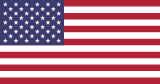
Every flag on a profile has a small marker at its bottom-right corner. The marker says what kind of status the flag stands for and whether a document has verified it. There are two views, each with its own shapes: work authorization view uses squares, citizenship view uses shields and diamonds, and seeking sponsorship is the same orange circle in both.
1. The two views
WORK AUTHORIZATION VIEW 3
Everything collapses
Work Authorization Verified
All confirmed states.
Work Authorization Self-Attested
All self-attested states.
Seeking Sponsorship
CITIZENSHIP VIEW 9
Specific status revealed
Citizenship Confirmed
Citizenship Self-Attested
Non-Citizen National Confirmed
Non-Citizen National Self-Attested
Permanent Resident Confirmed
Permanent Resident Self-Attested
Work Authorization Confirmed
Work Authorization Self-Attested
Seeking Sponsorship
2. What each marker means
Confirmed — shield
Blue shield
Citizenship confirmed
Purple shield
Non-citizen national confirmed
Green shield
Permanent resident confirmed
Teal shield
Work authorization confirmed
Self-attested — diamond
Light blue diamond
Citizenship self-attested
Light purple diamond
Non-citizen national self-attested
Light green diamond
Permanent residency self-attested
Yellow diamond
Work authorization self-attested
Sponsorship — circle
Orange circle
Seeking sponsorship
3. How the two views relate
The 9 markers of citizenship view collapse to 3 in work authorization view: the four shields become a green square, the four diamonds a yellow square, and sponsorship stays the orange circle. The European Union flag (freedom of movement) takes the same markers as a country.
4. Verified and self-attested
A status is self-attested until a document proves it: then its flag gets a shield (or a green square). When that document expires, the status goes back to self-attested and the flag back to a diamond (or a yellow square) until it’s verified again. How a status gets verified: How verification works.
5. Where you see which view
Your own profile shows both views.
On other people’s profiles, posts and lists you see work authorization view: a flag reads “Authorized to work” (or “Seeking sponsorship”), not the status behind it.
To see citizenship view on others, turn on Settings → Work status & verification → Enable citizenship view when viewing others. It needs your identity verified and a one-time certification, and the profiles you view with it are logged.
A status that doesn’t carry the right to work shows only in citizenship view.
A member can hide a flag from their profile. When you apply for a job, the employer sees only the statuses that make you eligible for it — even one you’ve hidden — in the view they have on.
Beluga Board — verified people, real opportunities.
 Beluga Board